Your BMS alarms, on your engineers' phones within a minute.
NotifyBMS turns the alarm emails your building management system already sends into a clear SMS and a phone call, in each person's own language. If nobody answers, it moves to the next person. You see every site live, from one screen.
Setup and the first test alarm are included. We reply within one working day.
Works with any BMS that can send an email. No changes to your BMS programming.
Works with the BMS you already run:
- Tridium Niagara
- Honeywell
- Johnson Controls
- Siemens Desigo
- Schneider EcoStruxure
- Distech
- and any system that sends alarm emails
How it works
Four steps, from the BMS to a person who takes responsibility. Nothing to install on your controllers.
- 1
Your BMS sends the alarm email
Exactly as it does today, to a Gmail inbox set up for the site. You choose which alarms count.
- 2
The alarm is written for people
The technical email becomes a short SMS in Arabic, English, Urdu, Hindi or whatever each person reads best.
- 3
The site phone sends it
A dedicated Android phone with a local SIM sends the SMS, then rings the person. No SMS gateway contract needed.
- 4
Someone takes it
The engineer replies "1". If nobody does in time, it goes to the supervisor, then to the manager.
What happens at 2 in the morning
Most alarms come when nobody is watching the BMS screen. This is one sequence as it appears in the alarm history, so the facility manager can see it in the morning.
Al Noor Hospital, main building
- AHU-03 supply fan failureAlarm email received from the BMS
- SMS to Khalid in Arabic and Ravi in English
- Khalid's phone rang
- Khalid replied "1"Ravi was told that Khalid is handling it
- Alarm cleared on site
See every building, live
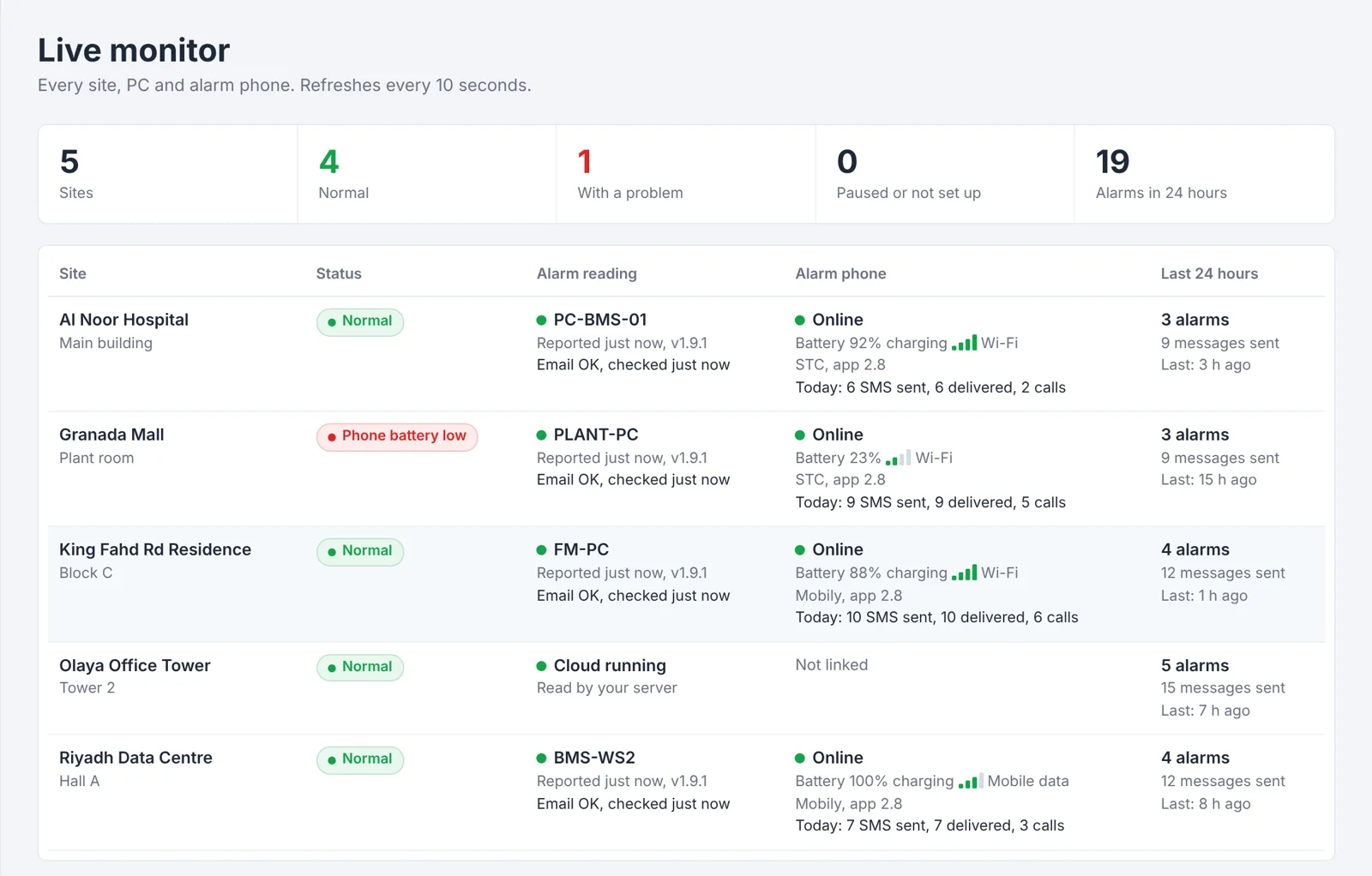
One screen shows each site's alarm path: the PC that reads the alarm emails, the alarm phone, its battery and signal, and today's messages.
- Red when something is wrong, with the exact step to check
- Problem alerts by email and SMS if a phone or PC is offline for 10 minutes
- Maintenance mode pauses calls during works, while alarms are still recorded
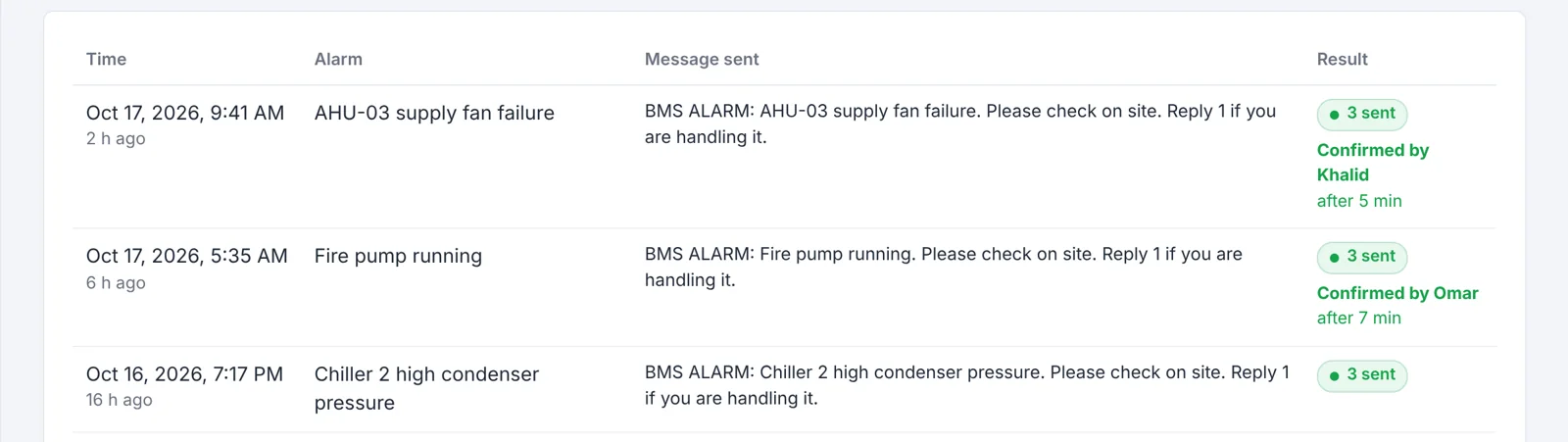
Know who answered, and how fast
Every alarm is kept with the message that was sent, how many people received it, and who replied "1".
- Response time for each alarm
- Monthly report by email on the 1st
- History kept for 6 months
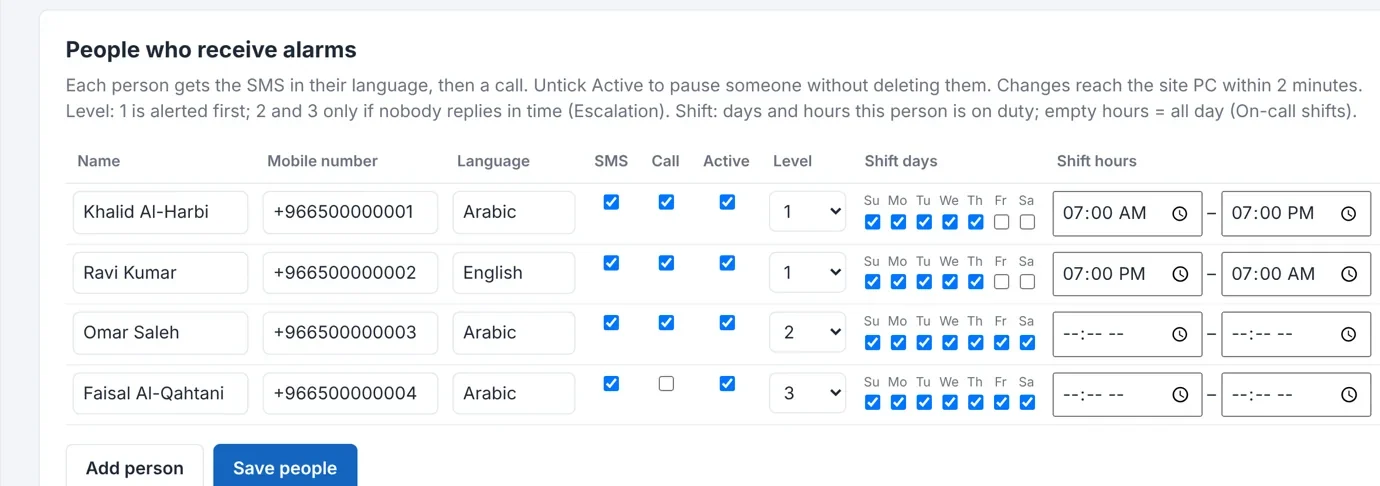
The right person, on the right shift
Give each engineer a language, a level and a shift. Day and night teams receive only their own alarms.
- Level 1 first, then supervisor, then manager if nobody replies
- Critical words like fire or leak call everybody at once
- Quiet hours: minor alarms by SMS only at night
A phone and SIM at the site, not an SMS contract
Alarms leave from an Android phone at the site with a normal STC, Mobily or Zain SIM. No international SMS gateway, no sender registration.
- Messages wait and are sent again if the phone or internet drops
- Updates install from your portal
- A second phone can take over if the first one fails
Each person's language
Arabic, English, Urdu, Hindi, Filipino and more, per person.
Nothing is lost
Late messages carry the original alarm time.
Weekly self-test
A test SMS proves the whole chain works.
Client logins
Each client manages their own people.
Two ways to run
A PC at the site, or our server reads the emails.
Automatic updates
PC program and phone app update themselves.
- Hosted in RiyadhServers in the Riyadh region of Saudi Arabia.
- Secure portalHTTPS everywhere and 2-step sign-in for administrators.
- Your data stays yoursEach client sees only their own site.
- Local supportArabic and English, installation in Riyadh.
Your BMS graphics and site PC, from anywhere
Open the BMS graphics, or the BMS workstation's screen, from your laptop or phone, without a VPN and without opening a single port on the site's router.
- YouLaptop or phone, anywhere
- NotifyBMSSecure portal, Riyadh
- Site PCConnects out, no ports
- BMSGraphics and workstation
BMS graphics from anywhere
Sign in to the portal, press Open, and the station's graphics (for example Niagara) open in your browser as if you were in the control room. Your BMS login still applies.
Remote desktop in the browser
See and use the site PC's screen from any browser. Nothing to install on your laptop, with Ctrl+Alt+Del, paste text and full screen.
Built to be safe for critical buildings
- No open ports. The site PC connects out to our server, like a web browser. Nothing on the internet can reach your BMS directly.
- 2-step sign-in with a code from your phone for every person who uses it.
- You choose who. Only the people you allow, site by site, and the site PC must allow it too.
- Full log of who opened what, from which address, and for how long. Sessions end by themselves after 30 minutes without use.
- One click to stop. End every session from the site PC or from the portal.
Available for sites that use the on-site PC. Included in the Pro plan as an option.
Solutions
Built for buildings where an alarm cannot wait until morning.
Hospitals
Isolation room pressure, theatres, chillers and medical gas alarms to the engineer on shift.
See how it worksData centres
CRAC failures, high temperature and leaks, before the white space heats up.
See how it worksFM companies
Many client sites, one screen, and a monthly report for each client.
See how it worksAlso used for malls, office towers, residential compounds and hotels.
Two ways to run it
Both use an alarm phone at the site. The difference is where the alarm emails are read.
| On-site PCProgram on a Windows PC at the site | CloudOur server reads the emails | |
|---|---|---|
| PC needed at site | Yes, one PC that stays on | No |
| Alarm phone at site | Yes | Yes |
| Updates | Install themselves | Nothing to install |
| Best for | Sites with a BMS workstation | Sites without a spare PC |
Monthly plans per site
Setup, alarm filter and the first test are included. The price depends on the number of sites.
Basic
For a single building
Request a quote
- SMS and ring call for every alarm
- Each person's language
- Client portal and alarm history
- Problem alerts and weekly self-test
- Automatic updates
Pro
For critical sites and FM companies
Request a quote
- Everything in Basic
- Reply to confirm and escalation
- On-call shifts, priority rules, quiet hours
- Monthly report by email
- Backup alarm phone
- Spoken voice calls (option)
- Remote BMS graphics and remote desktop (option)
The alarm phone uses a normal Saudi SIM (STC, Mobily or Zain). SMS and calls are charged by your operator, usually inside a monthly bundle.
Questions we hear often
Do we need to change our BMS?
No. If your BMS can email an alarm, that is all we need. We set a filter so only the alarms you choose are sent.
Which BMS brands work?
Any system that can send alarm emails, including Tridium Niagara, Honeywell, Johnson Controls, Siemens Desigo, Schneider EcoStruxure and Distech.
What do we need at the site?
An Android phone that stays on charge with a Saudi SIM for SMS and calls. For the on-site option, also a Windows PC that stays on. We can supply and set up both.
What if the internet or the phone goes down?
Alarms are kept and sent again for up to 24 hours. Late messages carry the original alarm time. If the phone or PC is offline for 10 minutes, your problem contacts are told by email.
Where is our data kept?
On our server in Saudi Arabia (Riyadh region). Each client sees only their own site. The portal uses HTTPS, and administrator accounts use 2-step sign-in.
Can the SMS be in Arabic?
Yes. Each person chooses a language. The client portal is currently in English.
Is remote access to our BMS safe?
Yes, if it is done this way. No port is opened on your router: the site PC connects out to our server over HTTPS. Every person needs 2-step sign-in, only people you allow can use it, every session is logged, and you can end all sessions at once from the site.
Can we see it working before we decide?
Yes. In a demo we send a real alarm to your own phone and show you the portal of a working site.
Built by BMS people in Riyadh
NotifyBMS started as a tool for our own projects: hospitals, data centres and towers where an alarm that waits until morning is not acceptable.
- Based inRiyadh, Saudi Arabia
- LanguagesEnglish and Arabic support
- On-site helpInstallation in Riyadh, or remote setup with your team anywhere in the Kingdom
- HostingServers in the Riyadh region
Book a demo
Tell us about your site. We reply within one working day and can show you a live alarm on your own phone.
- WhatsApp +966 56 600 4374Fastest reply
- info@notifybms.comFor quotes and documents